Labelling done right: compliant, accurate, and built into your recipes
.png)
If you're producing food for sale in Ireland, general labelling regulations apply — and they're not optional. The FSAI outlines clear rules for how food must be labelled, especially when it comes to ingredients, allergens, and nutritional data.
Whether you're printing labels for food-to-go, pre-packed deli items, sauces, or baked goods, getting this right is critical for both compliance and safety.
But when you're under pressure in a kitchen, with rotating menus, supplier changes, and new specials going up daily, maintaining accurate labels manually isn't just a burden — it's a risk.
What the FSAI expects
The FSAI's general labelling rules require that:
- Products are clearly named
- Ingredients are fully listed, with allergens emphasised
- Nutrition declarations are provided in the correct format
- Storage and usage instructions are included
- Net weight/volume is shown
- The origin and business address is clear
- The label is legible, consistent, and truthful
For any operator juggling recipes, suppliers, and compliance, that's a significant workload.
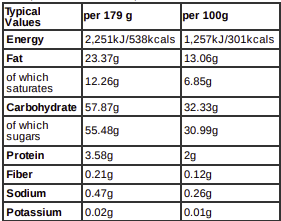
How Prepsheets handles allergen and nutrition labelling — in practice
Prepsheets was built to simplify this exact process — not just to make labels look good, but to ensure what goes on them is accurate and legally sound.
Allergens and nutrients are managed at ingredient level
In Prepsheets, allergens and nutrient data are handled at ingredient level, not recipe level. That means each ingredient you use has its allergen and nutritional properties recorded once — and then this data is automatically pulled into any recipe that uses it.
Two ways data enters the system
- Managed database (Prepsheets-managed): If you're using our managed database, we populate allergen and nutrition data using supplier-provided information. We maintain and verify this data on your behalf — and if you spot an ingredient that hasn't been verified, just flag it and we'll chase the supplier directly.
- Local ingredients (user-managed): If you're entering ingredients manually, you input the allergen and nutrient information yourself — usually from supplier specs or packaging. Once it's entered, that data will cascade into every recipe using that ingredient.
How you know it's verified — visual cues in the recipe
Prepsheets gives you immediate visual feedback in every recipe:
- Green: The ingredient has been fully verified for both allergens and nutrients.
- Orange: One of the two attributes (allergen or nutrient) has been verified. A small letter beside the ingredient will indicate what's verified: "A" = allergens, "N" = nutrients.
- Black: Neither allergens nor nutrients have been verified.
What to do:
- If the ingredient is managed by Prepsheets, just contact us. We'll request the data from the supplier and verify it for you.
- If the ingredient is user-managed, you'll need to check the label or supplier sheet, then enter and verify it yourself.
Once an ingredient is updated — verified or edited — all recipes using that ingredient are automatically updated too. If that one item is in 100 recipes, all 100 will now reflect the updated allergen and nutritional information.
Labelling that matches the standards
Once your ingredients are in place, Prepsheets allows you to generate fully compliant food labels, with:
- Clear ingredient listings
- Allergens in bold
- Percentage ingredient breakdowns (where needed)
- Use-by dates, weights, and instructions
- All required layout and format elements
You can even input the ingredient breakdown of an ingredient (e.g. "brown sauce contains water, sugar, vinegar…") so that your label reflects not just what you've made, but what's in the components too.
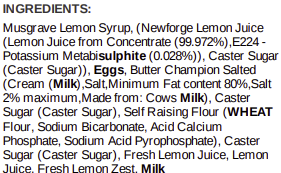
Bottom line
Prepsheets doesn't just help you create labels — it helps you create the right labels, every time. It takes the guesswork and duplication out of allergen and nutrient compliance, and makes it simple for your team to stay on top of what's required.
Whether you're managing 20 dishes or 200, your food labels — and your compliance — are only as good as the data that feeds them. Prepsheets ensures that data is right, and does the heavy lifting so your team doesn't have to.