Help Centre › Company Setup
Add-ons & Billing
Every new Prepsheets account starts on a free trial with full access. When the trial ends you keep recipe costing, and you can switch on optional modules — Labelling, Preplists and Labour — depending on what your kitchen needs. You manage all of this on the Billing page.
Where do I manage my plan?
Go to Settings and open Billing. Your current plan status is shown at the top — during the trial you'll see when it ends and a Manage Billing button to subscribe.
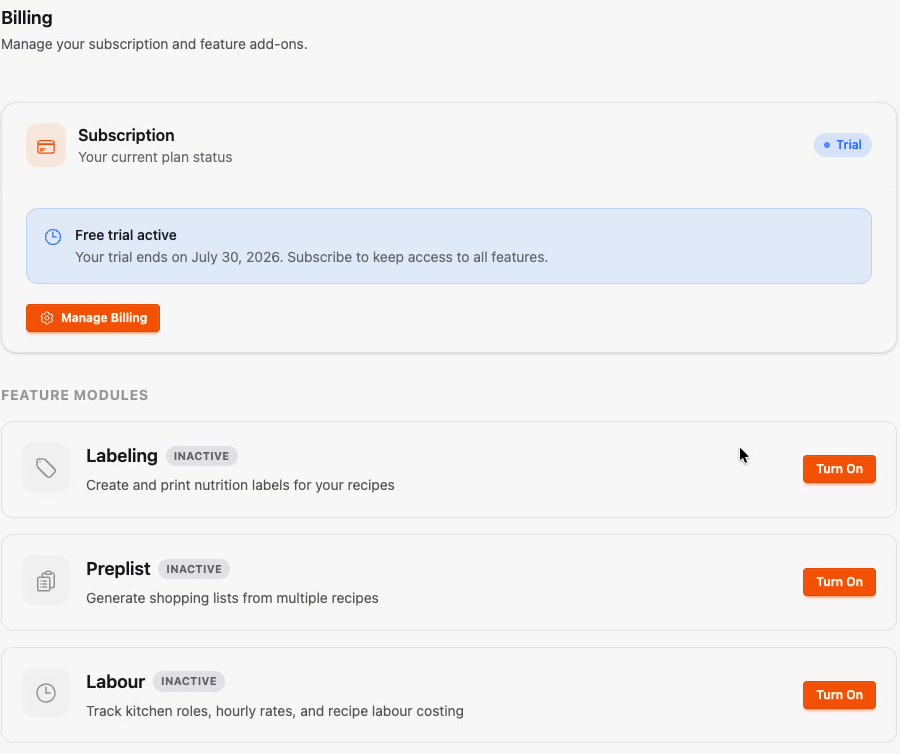
What are the feature modules?
- Labelling — create and print your labels: internal food-safety labels for refrigeration, freezing, prep and storage, plus food-to-go labels. Works with a generic printer, or connect a DateCodeGenie printer for easy label printing while you manage the data in Prepsheets.
- Preplists — kitchen production planning. Tell Prepsheets what you plan to make and it generates your shopping and order lists, split by supplier. It can link to your stock system to factor in what you already have.
- Labour — track the cost of labour within your recipes, so your margins reflect staff time as well as ingredients.
Each module has a Turn On button on the Billing page once your trial converts. Turn on only what you need.