Help Centre › Company Setup
Your Default Settings
Your General settings hold the organisation basics you chose when you registered — business name, country, currency, measurement system, wastage and margin alert — plus your default shelf lives. If you skipped any of these at sign-up, this is where you complete them.
Where are my default settings?
Go to Settings and open General.
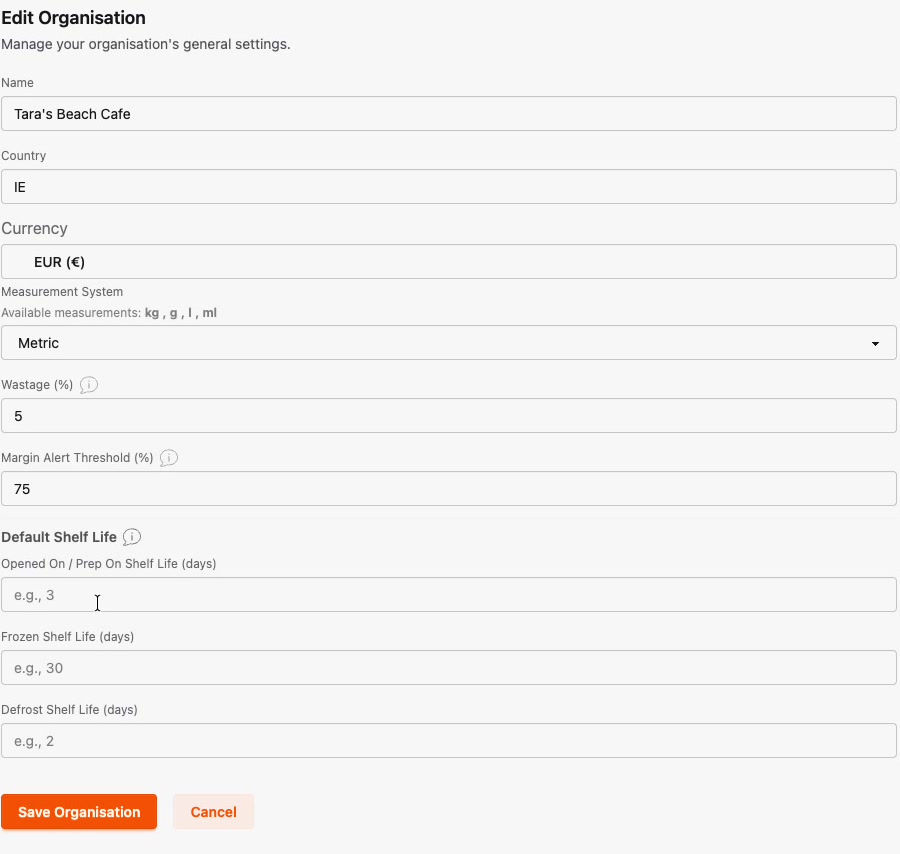
What each setting does
- Name, Country, Currency, Measurement System — your organisation basics. Metric gives you kg, g, l and ml.
- Wastage (%) — the wastage Prepsheets builds into every recipe cost. 5% is a common starting point; you can fine-tune it per recipe.
- Margin Alert Threshold (%) — if a recipe's margin falls below this figure it shows in red, so you spot under-priced dishes at a glance. For example, 75 for a minimum 75% gross profit margin.
Default shelf lives
Under Default Shelf Life you set the defaults that flow onto your labels. Prepsheets suggests 3 days opened/prep, 30 days frozen and 2 days defrost. Change them if your kitchen works to different figures — they apply automatically to new ingredients and recipes, and you can still override any individual item.
Click Save Organisation to keep your changes.
Tip: Your VAT / tax rates live under the Tax Rates tab, and your suppliers under Suppliers — both separate from these general defaults.