Recipe intelligence · Professional kitchen software
Recipe intelligence and costing software for professional kitchens
Start with an accurate recipe. Know what every portion actually costs.
Prepsheets is a recipe intelligence tool that connects supplier ingredients, recipe yields, portion sizes, allergens, labels and production quantities – with actual recipe costs at the centre.
Build your recipe correctly from the start so you can price it with confidence, make consistent portions, and plan what you need to make in your kitchen and order from your suppliers.
See what each portion costs. Protect your margin. Reduce avoidable food waste.
Cost the whole product, including the finishing touches
The buttercream on a muffin, the garnish on a dish and the time spent preparing it all affect your margin. Moving information between the different platforms your kitchen uses takes time too.
Prepsheets brings ingredient intelligence – costs, nutritional information and allergens – together so you can build recipes with recorded yields, wastage allowances and allocated labour.
See what each portion costs and how your selling price affects your margin. Scale recipes for different production quantities, and print labels for both finished recipes and individual ingredients.
Where your other platforms allow compatible connections, Prepsheets can help information move between them, reducing repeated data entry.
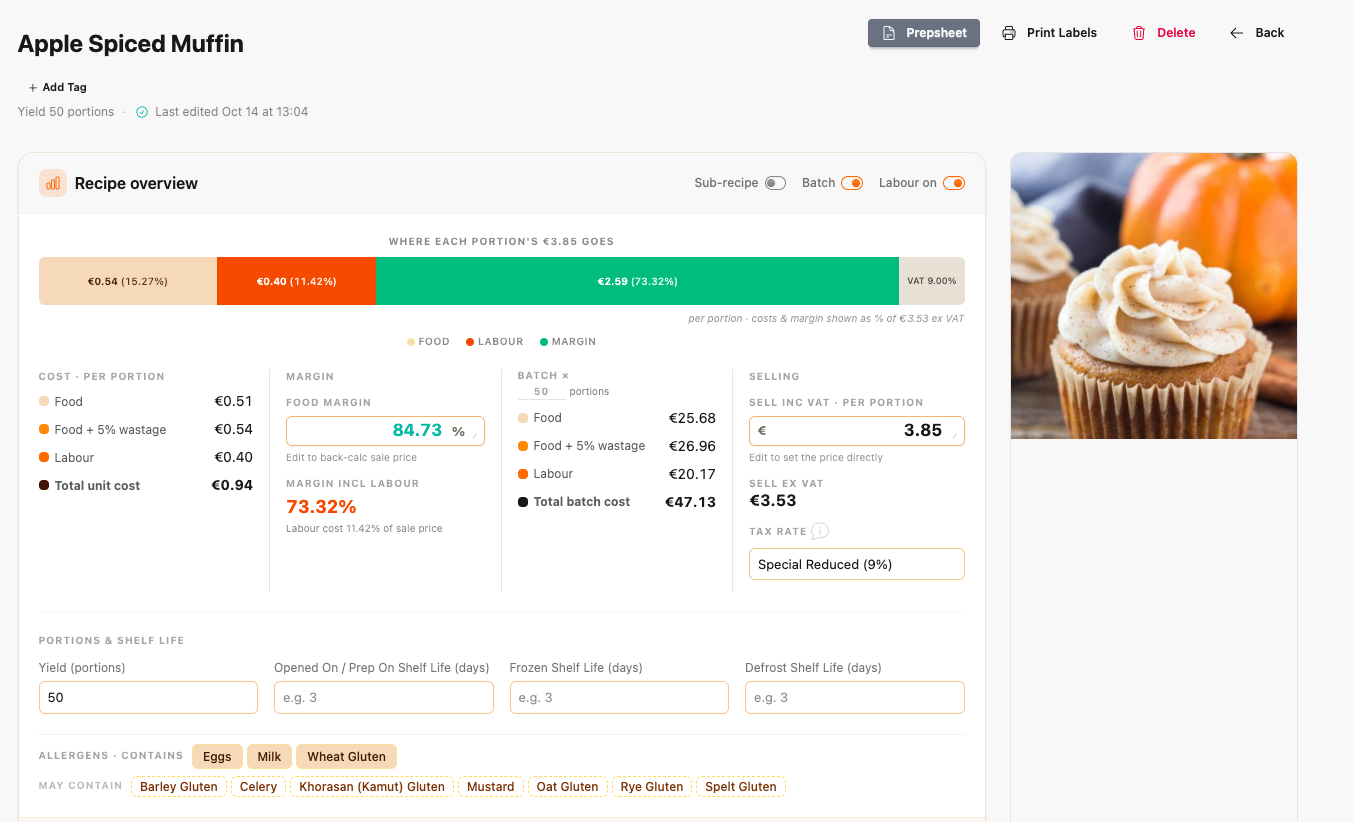
Our apple spiced muffin recipe is a good example of why the whole product matters. The generous buttercream is a substantial part of the muffin and its ingredient cost. Leaving it out of the costing would give you the wrong picture.
The worked example shows a batch of 50 muffins, including the topping, ingredients and labour. Use your own supplier prices and portion sizes to see what works for your business. If costs rise, you can see whether your selling price needs to change.
Work from the ingredients you actually buy
A recipe is only as useful as the ingredient intelligence behind it.
In Prepsheets, an ingredient can be linked to its actual supplier and product code. Store the supplier’s product specification with the ingredient so your team can access the supporting information wherever they are and whenever they need it.
That connects your recipe to the product being used in your kitchen, rather than a generic ingredient that may have different costs, allergens and nutritional information.
Ingredients + Add Ingredient
| INGREDIENT | START QTY | END QTY | CALORIES | COST | |||
|---|---|---|---|---|---|---|---|
| ≡ | Step 1: Mix Until Just Combined | ||||||
| ≡ | 390702 | Country Range Plain Flour (6x1.5kg) | 1250g | 1250g | 4743 | €1.10 | |
| ≡ | 35023 | Brakes Baking Powder 1x850 GM | 62.5g | 62.5g | 121 | €0.31 | |
| ≡ | 31220 | Salt- Fine Table (1kg) | 12.5g | 12.5g | 0 | €0.01 | |
| ≡ | 33710 | Sysco Classic Ground Mixed Spice 6x450 GM | 37.5g | 37.5g | 108 | €0.34 | |
| ≡ | 63768 | Caster Sugar Mckinney’s (10x1kg) | 550g | 550g | 2200 | €0.77 | |
| ≡ | 477571 | Eggs Large Loose 1×30 Dozen | 10unit | 10unit | 960 | €5.00 | |
| ≡ | 485634 | Champion Fresh Milk | 750ml | 750ml | 480 | €0.75 | |
| ≡ | 25845 | Oil | 450ml | 450ml | 4050 | €2.07 | |
| ≡ | 5018420 | Apples Cooking Bramley 13kg Case | 850g | 850g | 366 | €1.18 | |
| ≡ | Butter Cream | ||||||
| ≡ | 5023520 | Champion Salted Butter 20x454 GM | 1050g | 1050g | 7760 | €6.82 | |
| ≡ | 63799 | Gem Icing Sugar (4X3Kg) | 2300g | 2300g | 9200 | €4.15 | |
| ≡ | 113279 | ORGANIC NATURAL VANILLA EXTRACT | 20g | 20g | 58 | €1.98 | |
| ≡ | Pumkin Spice | ||||||
| ≡ | 612110 | Musgrave Excellence Ground Cinnamon | 15g | 15g | 37 | €0.13 | |
| ≡ | 386385 | Schwartz For Chef Ground Ginger | 10g | 10g | 35 | €0.39 | |
| ≡ | A054420 | Organic Nutmeg Powder | 10g | 10g | 53 | €0.44 | |
| ≡ | 84810 | Brakes Whole Cloves 1x400 GM | 5g | 5g | 17 | €0.23 | |
The ingredient display from our worked muffin recipe, preserving the Prepsheets format, product names, codes, Managed/Local status, A/N badges, start and end quantities, calories and costs. This website example is a read-only illustration.
Keep allergens connected through recipes and sub-recipes
An ingredient may go into a sauce, that sauce into a filling, and that filling into a finished dish.
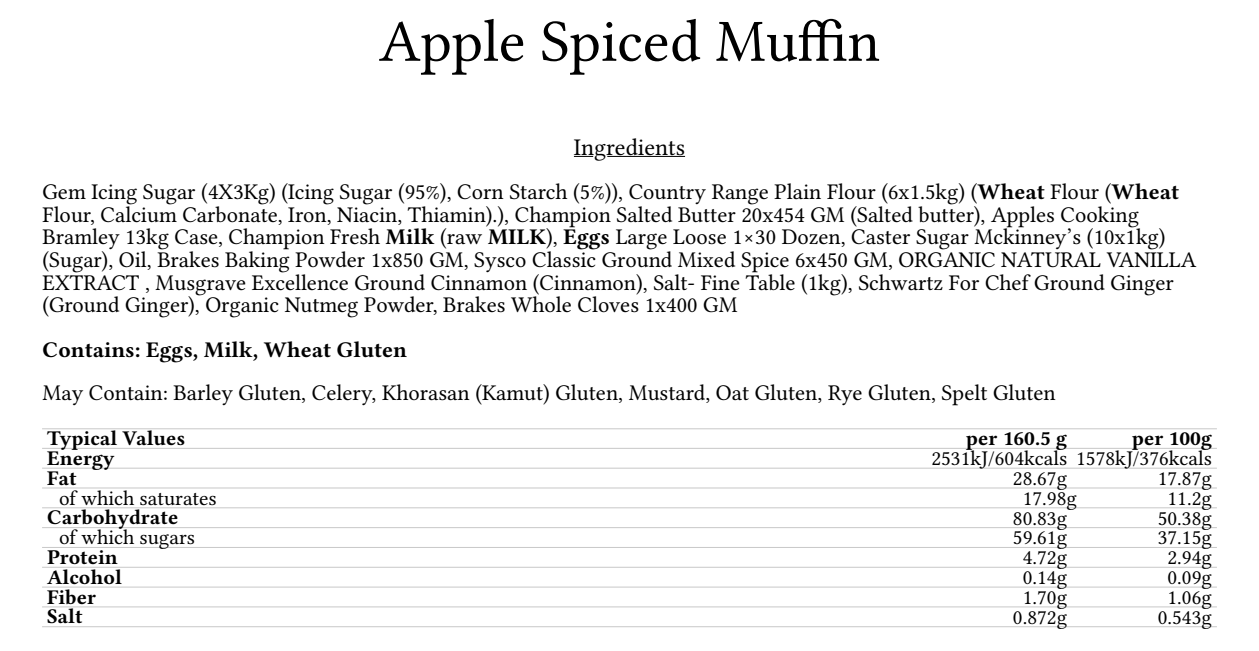
Prepsheets carries recorded allergen information through linked recipes and sub-recipes, keeping “contains” and “may contain” separate.
You can also store documents with recipes, including shelf-life testing reports, for easy access whenever and wherever they are needed. Keep ingredient specifications and recipe documents available to your team, including when supporting information is requested during a food safety inspection.
If a supplier changes a product, check and update its ingredient information. Your team also needs to account for allergens that could be introduced through preparation, shared equipment or storage in your own kitchen.
Create labels for recipes and ingredients
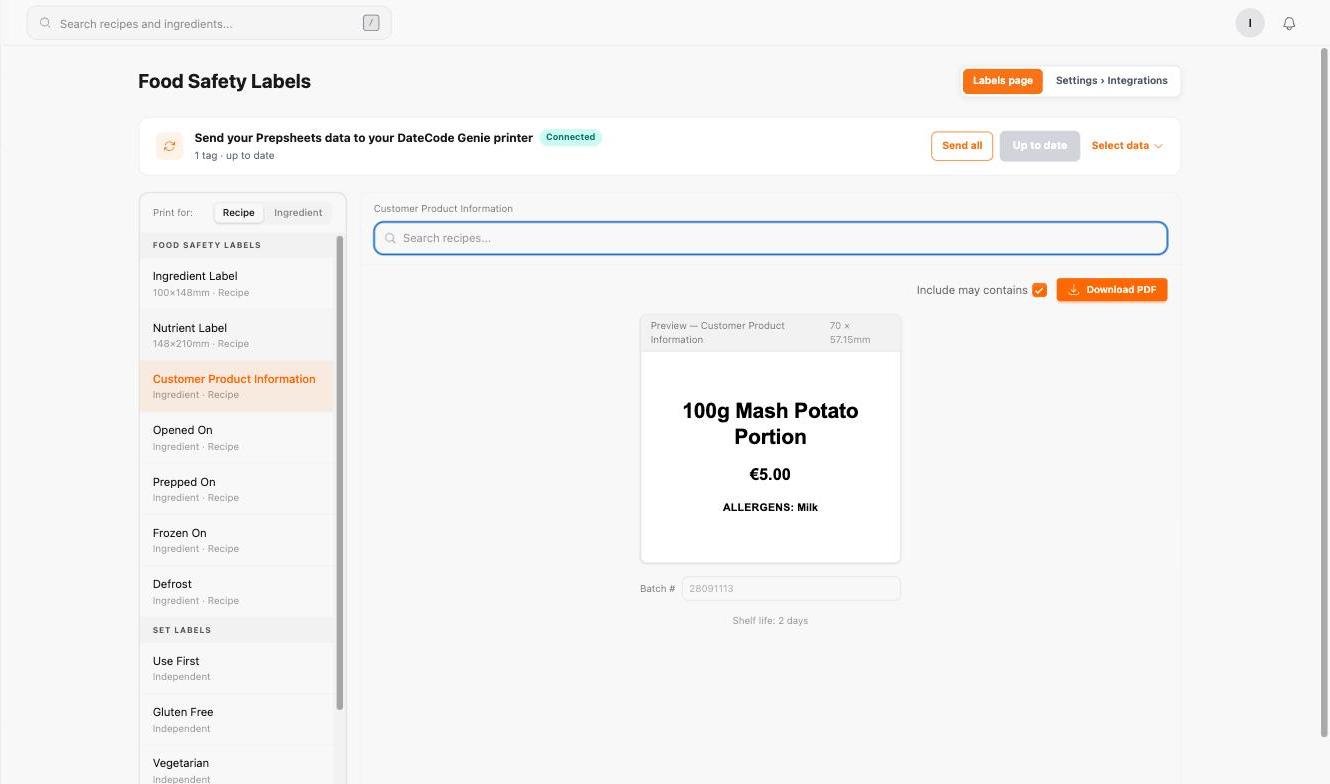
Use your ingredient and recipe information to create labels for preparation, storage and service:
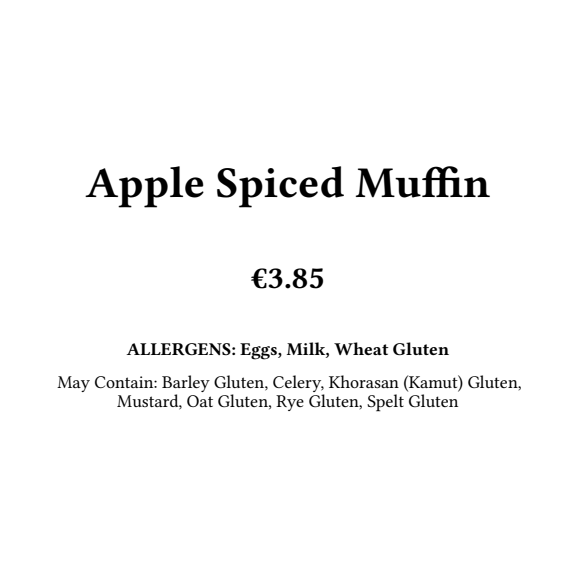
- Customer display labels showing the price and allergens.
- Wrapped-to-go labels with ingredients, allergens and calculated nutrition.
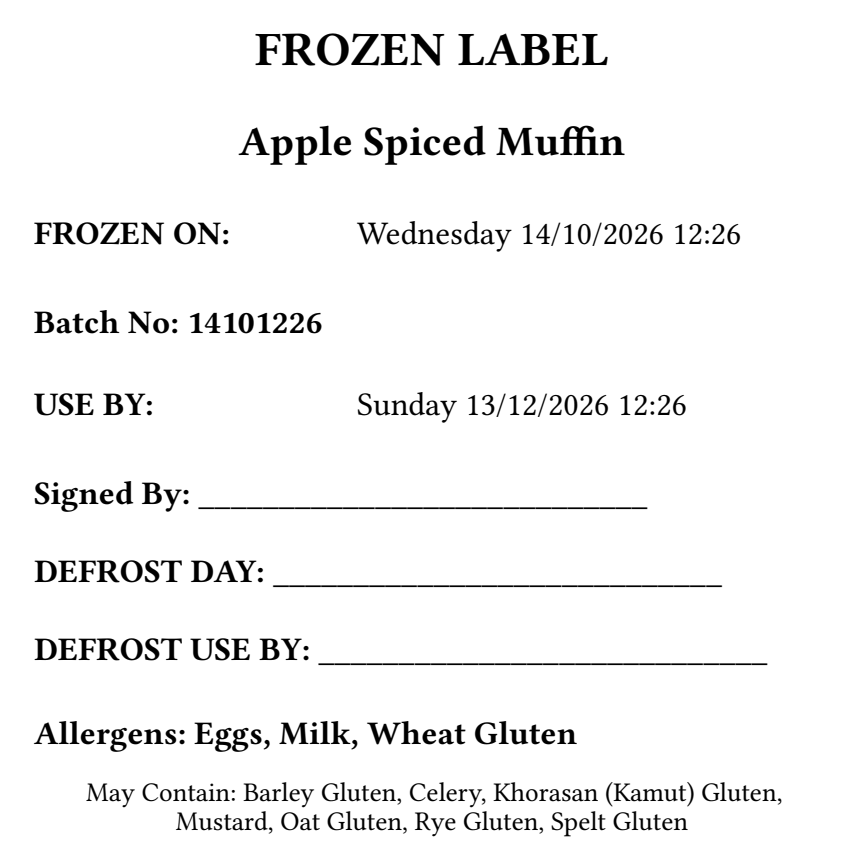
- Kitchen labels for preparation, freezing and defrosting.
- Ingredient storage labels for products you use in your kitchen.
Create your labels in Prepsheets and send them to your printer.
If you batch-bake muffins and freeze some for later, create the freezer labels when they go into storage. You can also print storage labels directly from an ingredient’s record.
Set shelf-life dates using testing or guidance from your relevant local food safety authority.
Make what you need. Order what you’re short of.
Accurate recipes are the starting point for accurate production planning.
When your recipe yield and portion size are correct, you can calculate the ingredients needed for the number of portions you intend to make.
Doing this manually means scaling each recipe, finding ingredients used across several dishes, and adding those quantities together. It takes time and creates opportunities for calculation errors.
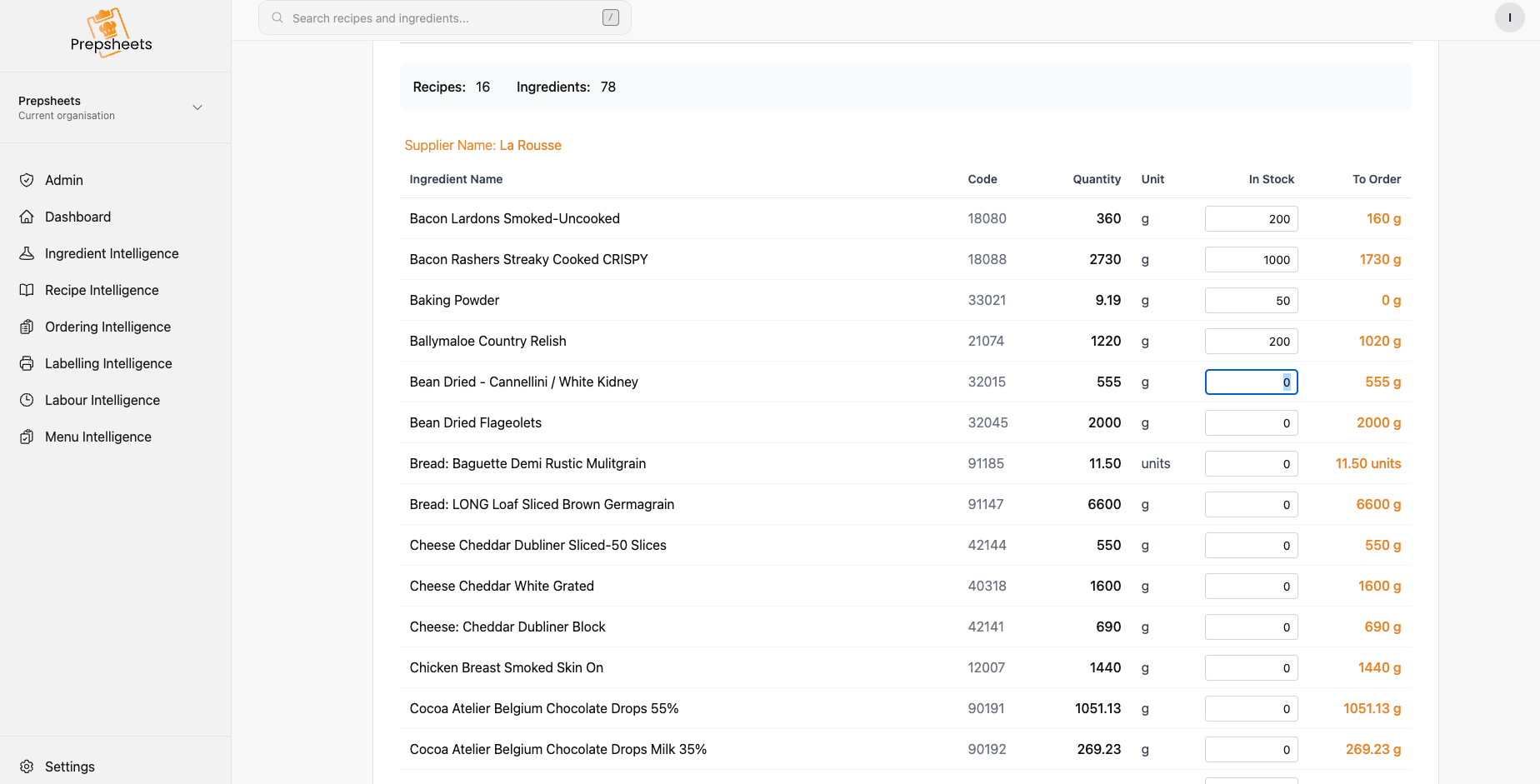
In Preplists, select your recipes and enter your production quantities. Prepsheets calculates the ingredient requirements across the selected recipes, combines the requirements for the same ingredient, and groups them by supplier – building a supplier order sheet for each supplier.
Enter the usable stock you already have, or use a supported stock-system connection, to see what remains to be ordered.
This helps you move away from ordering the same quantities every week without checking what is planned or already in stock.
Consistent portions help control overproduction. Stock-adjusted ordering helps avoid buying ingredients you already have. Together, they support tighter stock control and less avoidable food waste.
Connect with the systems your kitchen already uses
You may already have an EPoS system, stock platform, ordering system, labelling equipment or digital menus.
Prepsheets can connect with other platforms where compatible APIs or data-sharing options are available. Tell us which systems you use so we can confirm what can be connected and any setup required.
Keep your ingredient and recipe intelligence working across your kitchen’s systems, with less time spent copying information from one platform to another.
See what this looks like with your recipes
Bring one of your recipes and tell us how your kitchen operates.
Brian can show you how supplier ingredients, actual recipe costs, portions, allergens, labels and production planning fit together in Prepsheets.
Start with the correct recipe. Build the rest of your kitchen intelligence around it.