Making 5 portions or 100? Let Prepsheets do the calculations
Published 27 October 2026 · 6 min read
By Tara Beattie, Co-founder of Prepsheets
Prepsheets helps you scale a recipe for the number of portions you actually need to make. Start with an accurate recipe and its correct yield, then choose your production quantity. The software calculates the ingredient quantities and food costs while keeping the recorded portion size consistent.
In a busy kitchen, you might need 20 portions today and 100 for a function tomorrow. You shouldn't have to work through every ingredient with a calculator each time, or keep separate versions of the same recipe for different quantities.
That is where having your recipe built correctly from the start makes a difference.
Start with what your recipe actually makes
You can enter a recipe in Prepsheets as a single portion or as a recipe that makes multiple portions.
If your recipe makes 20 portions, enter the ingredients for those 20 portions and record the yield as 20. Prepsheets can then work out the quantities and ingredient cost for one portion, and use that information when you need a different number.
You can ask for 5 portions, 35 portions or 100 portions. The portion stays the same; the amount you are making changes.
The important part is getting the original recipe right. Include the ingredients you actually buy, the correct quantities, your yield and any recorded wastage allowances. If the starting recipe is wrong, scaling it will carry that error into a larger batch.
Choose today's quantity without changing your original recipe
Your saved recipe yield tells Prepsheets how many portions the original recipe makes. Your production quantity tells it how many portions you want to make today.
For example, if your saved recipe makes 50 muffins, leave that yield at 50. Open the Prepsheet Generator, choose Portions under Scale By, and enter the quantity you need. You can then print the Prepsheet for the kitchen.
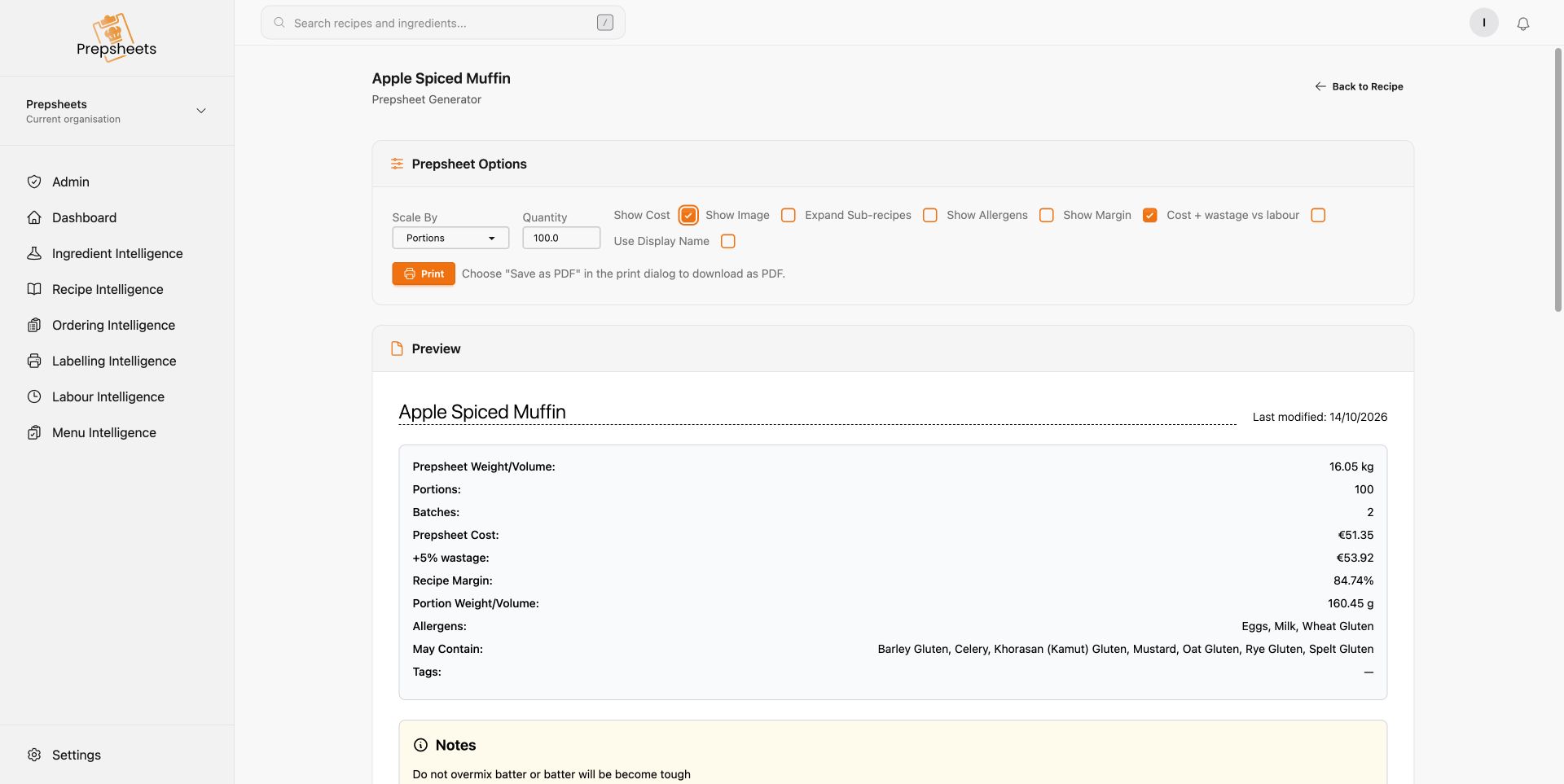
The original muffin recipe makes 50. Here, the Prepsheet is set to 100 portions, which the software shows as two batches.
You don't need to change the original recipe every time your production plan changes.
You can also scale by weight or volume. For example, you might need a particular weight of a recipe, or a particular volume of a soup or sauce. Choose Weight / Volume in the Prepsheet Generator and enter the amount you need, using the appropriate unit for your recipe. Prepsheets calculates the ingredient quantities for you.
A real example: our apple spiced muffins
Our apple spiced muffin recipe makes 50 portions, including the generous vanilla buttercream and spice finish.
I checked the live recipe and generated a Prepsheet for 100 portions. Prepsheets changed the flour from 1,250g to 2,500g, the eggs from 10 to 20, and the milk from 750ml to 1,500ml. The buttercream scaled too, including the butter, icing sugar and vanilla.
That topping matters. It is a substantial part of the finished product and its ingredient cost. Scaling the muffin batter while forgetting the icing would leave you short in the kitchen and give you the wrong picture of your costs.
For the 100-portion Prepsheet, the recorded ingredient cost was €51.35, or €53.92 including the recipe's 5% wastage allowance. These are our example supplier costs, checked on 27 October 2026. Your own ingredients and supplier prices will give you your own figures.
The saved 50-portion recipe also includes allocated labour. Keep that part realistic when planning production: making twice as many muffins does not necessarily mean twice as much hands-on work. Review the time your team actually needs so your margin reflects how your kitchen operates.
Keep the portions consistent
Scaling a recipe should change how much you make, not what each customer receives.
If one batch gets a generous swirl of buttercream and the next gets a much smaller one, you are selling different products at the same price. Consistent portions help you understand the cost of what you are serving and make the amount you planned.
The calculations also remove the need to manually multiply every ingredient. Your team still needs to weigh, portion and prepare correctly.
Write your method so it works for whatever quantity you are making. Our muffin example shows why: “divide between 50 muffin cases” ties the instruction to the original batch. Instead, write “Set out one muffin case for each portion you are making, then divide the batter evenly between the cases.” That way, the method works whether you are making 20, 50 or 100 muffins.
Keep ingredient quantities in the recipe quantities, where Prepsheets can scale them, rather than repeating fixed amounts in the method. Oven capacity and cooking times still need your kitchen's judgement.
Turn your recipes into a production and ordering plan
Most kitchens are making several recipes, with ingredients shared across soups, sandwiches, salads and baking.
In the Preplist Generator, select the recipes you plan to make and enter the required quantities. Prepsheets calculates the ingredient requirements across those recipes and groups them by supplier, with product codes, quantities and units.
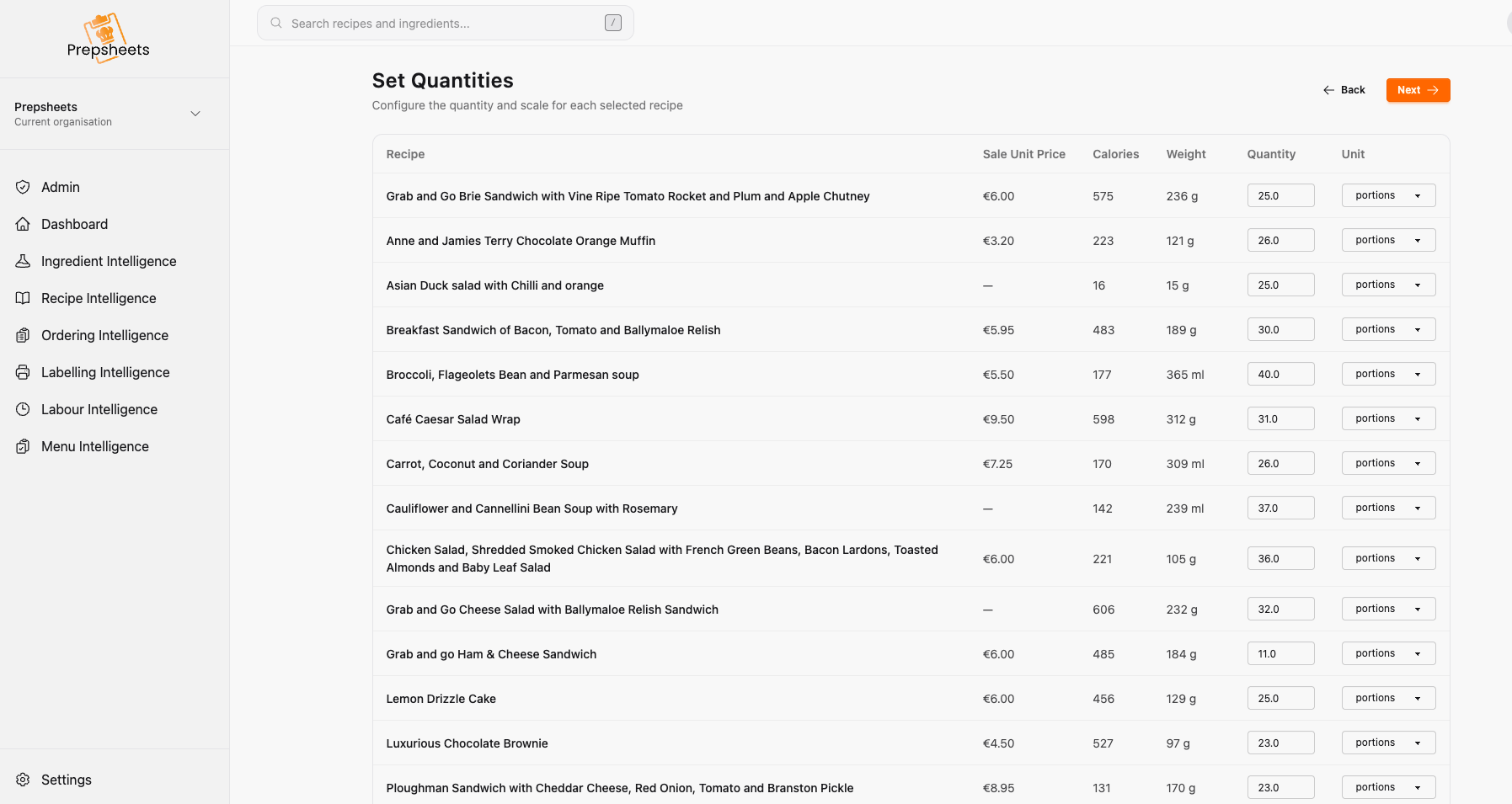
A separate production example showing quantities entered for a selection of 16 recipes.
Enter the usable stock you already have, or use a supported stock system connection, to see what remains to be ordered.
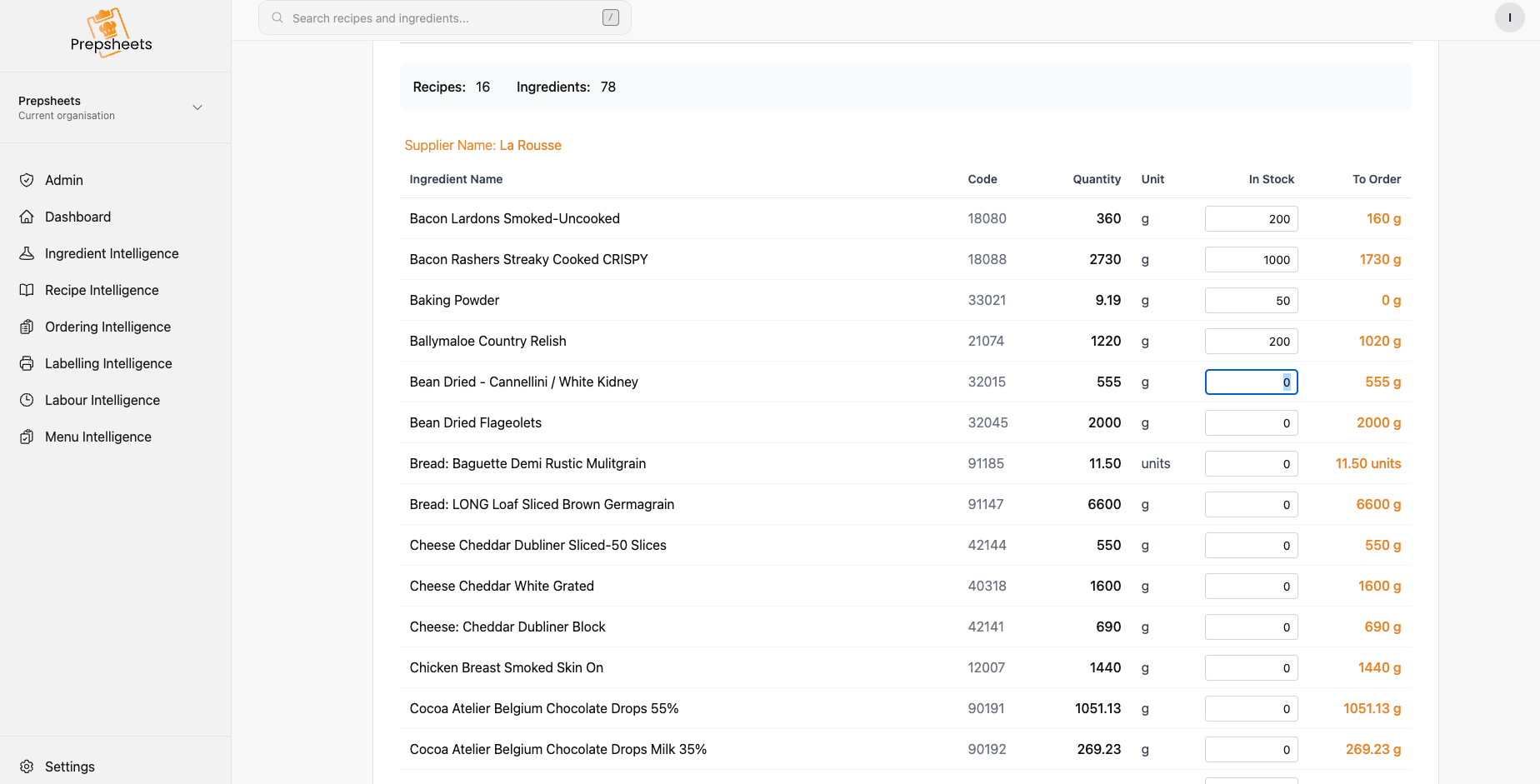
The supplier list separates the quantity required, stock already available and the amount still to order.
This helps you move away from ordering the same quantities every week simply because that is what you ordered last week. Your order starts with what you plan to make and what you already have.
Accurate recipes, consistent portions and stock checks all work together to help reduce over-ordering, over-production and avoidable food waste. You can see the process in our Preplists walkthrough.
See it with one of your own recipes
Whether you make five portions or a hundred, the starting point is the same: a correct recipe that reflects the product you actually serve.
Prepsheets connects that recipe to your supplier ingredients, food costs, portions and production quantities. You can see more in our recipe intelligence and costing software walkthrough.
If you would like to see how it could work in your kitchen, grab a time with Brian. Bring one of your recipes and he can work through it with you, from the original yield to the quantities you need to prepare and order.